



Are you wondering whether the MacBook Air M4 is worth upgrading to, or if the MacBook Air M3 is still the smarter buy? Apple keeps improving the MacBook Air every year, but not every new model is a must-have.
If you already own a MacBook Air M3, you might be asking yourself if the M4 brings enough new features to justify spending more money. And if you’re buying your first MacBook Air, choosing between the two can feel confusing.
The good news is that both laptops are excellent. They are thin, lightweight, fast, and offer amazing battery life. But the M4 does come with a few upgrades that could make a difference depending on how you use your laptop. Let’s compare the MacBook Air M3 and MacBook Air M4 to help you decide.
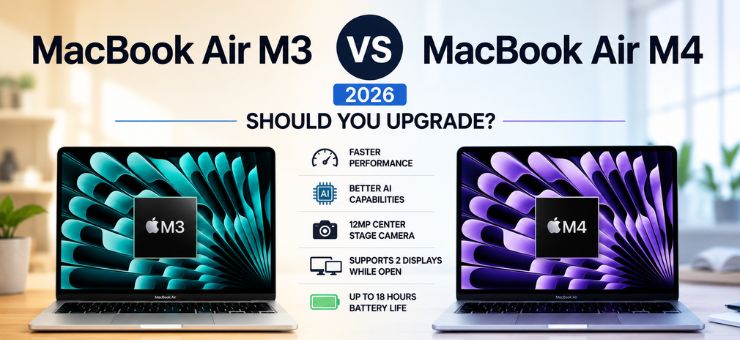
MacBook Air M3 vs MacBook Air M4: Quick Comparison
| Feature | MacBook Air M3 | MacBook Air M4 |
| Processor | Apple M3 chip | Apple M4 chip |
| CPU | 8-core | 10-core (base model) |
| GPU | Up to 10-core | Up to 10-core |
| Neural Engine | 16-core | Faster 16-core Neural Engine |
| RAM | 16GB standard (2026) | 16GB standard |
| Storage | 256GB to 2TB | 256GB to 2TB |
| Battery Life | Up to 18 hours | Up to 18 hours |
| Display | Liquid Retina | Liquid Retina |
| External Displays | Up to 2 displays (lid closed) | Up to 2 external displays while laptop is open |
| Camera | 1080p FaceTime HD | 12MP Center Stage camera |
| Best For | Everyday users | AI tasks, multitasking, professionals |
Design: You Probably Won’t Notice the Difference
At first glance, both laptops look almost identical. Apple has kept the same slim and lightweight design because people already love it. Both are available in 13-inch and 15-inch sizes, feature the same aluminum body, large Force Touch trackpad, Magic Keyboard, and bright Liquid Retina display. If someone placed the M3 and M4 side by side, most people wouldn’t be able to tell which one is newer.
Performance: The M4 Takes the Lead
This is where the biggest improvement happens. The M4 chip is built using Apple’s newer technology, making it faster and more efficient than the M3. Everyday tasks like browsing the web, streaming videos, writing documents, and attending video calls feel smooth on both laptops. However, the M4 handles demanding work much better.
You’ll notice the difference if you regularly:
- Edit 4K videos
- Work with large Photoshop files
- Run multiple apps together
- Use AI-powered tools
- Write code or build apps
The M3 is already very fast, but the M4 simply gives you more room to grow.
AI Features Are Better on the M4
Artificial Intelligence is becoming a bigger part of everyday computing, and Apple has started adding more AI features across macOS. The M4 has a faster Neural Engine, which means it can process AI tasks more efficiently.
This helps with things like:
- Image editing
- Live transcription
- Writing assistance
- Smart photo search
- AI-powered productivity apps
If you expect to use Apple’s latest AI features over the next few years, the M4 is the better investment.
Camera Gets a Nice Upgrade
The MacBook Air M4 includes a 12MP Center Stage camera, while the M3 has a standard 1080p FaceTime camera. Center Stage automatically keeps you in the middle of the frame during video calls, even if you move around.
This is useful if you:
- Attend online meetings
- Teach classes
- Record videos
- Join virtual interviews
It’s not a huge reason to upgrade, but it’s definitely a welcome improvement.
External Display Support Is More Flexible
This is one upgrade many users have been waiting for. With the MacBook Air M3, you can use two external displays only when the laptop lid is closed. The M4 changes that. Now you can connect two external monitors while still using the MacBook’s own display. If your desk setup includes multiple screens, this makes a real difference.
Battery Life: Still Excellent
Apple claims both laptops can deliver up to 18 hours of battery life. In everyday use, there’s very little difference. Whether you’re working from a coffee shop, travelling, or attending classes, both easily last through a full day without constantly searching for a charger. Battery life is one area where both laptops perform equally well.
Which One Offers Better Value?
This depends on your budget.
Buy the MacBook Air M3 if:
- You find it at a good discount.
- You mainly browse, study, stream, or work with Office apps.
- You don’t need the newest AI features.
- You want excellent performance while spending less.
The M3 remains one of the best everyday laptops you can buy.
Buy the MacBook Air M4 if:
- You plan to keep your laptop for several years.
- You use creative software regularly.
- You want better support for future AI features.
- You need improved external display support.
- You attend lots of video meetings.
The M4 gives you more performance without changing the overall experience.
Pros and Cons
MacBook Air M3
Pros
- Lower price
- Excellent battery life
- Fast for everyday work
- Premium design
- Great display
Cons
- Older camera
- Limited external display flexibility
- Slightly slower AI performance
MacBook Air M4
Pros
- Faster processor
- Better AI performance
- Improved webcam
- More flexible monitor support
- Better long-term value
Cons
- Higher price
- Design is almost identical to the M3
Should You Upgrade from the M3 to the M4?
If you already own a MacBook Air M3, the answer is probably no. The M3 is still an incredibly capable laptop that handles almost everything with ease. Unless your work depends on AI tools, video editing, or multiple external displays, the upgrade isn’t dramatic enough to justify the cost. However, if you’re coming from an older Intel MacBook or an M1 model, the M4 is a fantastic upgrade that offers better speed, improved efficiency, and newer features that will stay relevant for years.
Final Verdict
T The M3 remains the better option if you’re looking for the best value and can find it at a discounted price. It delivers more than enough power for students, professionals, and everyday users. The M4, on the other hand, is the smarter pick if you want the latest technology, better AI performance, an upgraded camera, and stronger future-proofing. At the end of the day, your decision comes down to one simple question: Do you need the newest features, or would you rather save money? For many people, the M3 will still be enough. But if you’re buying a laptop to last the next five or six years, the M4 is the one that’s better prepared for what’s ahead.
For more gadgets-related info, visit this website.
FAQ
1. Is the MacBook Air M4 much faster than the MacBook Air M3?
A. The MacBook Air M4 offers better overall performance, especially for AI tasks, video editing, and multitasking. However, for everyday activities like browsing, streaming, and office work, the difference is not very noticeable.
2. Should I upgrade from the MacBook Air M3 to the M4?
A. If you already own a MacBook Air M3, upgrading isn’t necessary unless you need the M4’s improved AI capabilities, better webcam, or enhanced support for multiple external displays. The M3 is still a powerful and reliable laptop.
3. Which MacBook Air is better for students and everyday users?
A. Both models are excellent for students and regular users. If you can get the MacBook Air M3 at a lower price, it offers better value. If you’re buying a laptop to use for the next five or more years, the MacBook Air M4 is the better long-term investment.